
Part 2: The Morning I Realized the Door Had No Lock
Short-lived tokens, rotating refresh, 2FA, email-match OAuth, and the one-call revocation I built the day I couldn't cleanly remove one person.
By Mohammed jawed · · 14 min read

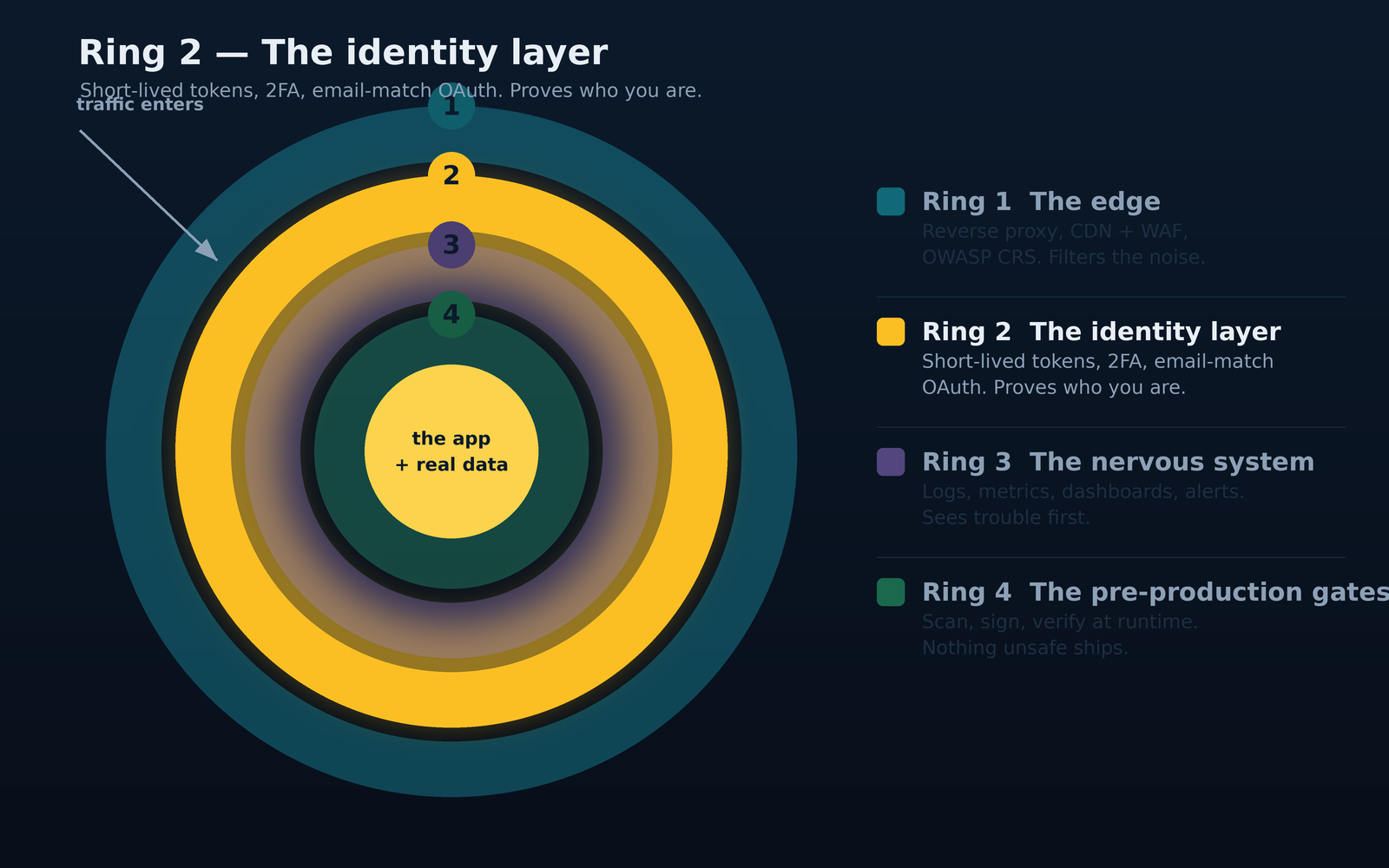
The Identity Layer
Part 2 of Security Without a Security Team, a 4-part series on the security controls behind live production systems at Mannat AI Labs.
Part 0: Security Without a Security Team
Part 1: What a WAF Monitor Taught Me About the Real Cost of a Public IP
The morning I realized the door had no lock
One weekday morning I opened my messages to a short note - It said, more or less: "Can you take X out of the system? Today, please."
I read it twice. Then I read it a third time, because I was suddenly aware that I did not have a clean, one-motion answer to the request. There was a user record I could deactivate in the database. That would stop them logging in next time. But what about the browser tab they still had open, halfway across town, with a valid session token in memory? What about the mobile PWA on their phone, refreshing itself in the background? What about the CSV export they might already have queued? What about their laptop, which they had definitely not returned yet?
I did what any engineer does in that moment. I stared at the ceiling. I made garam masala chai(tea). Then I opened the codebase and started thinking, hard, about a subject I had been treating as "done" for six months: authentication.
This piece is the story of how the identity layer behind the system grew up. Not the finished, polished, best-practice version. The actual version, with the awkward decisions, the things I got wrong, the things I got right for reasons I did not appreciate at the time, and the things I still have not fixed.
Why auth is not one problem
When a small-team engineer says "we have auth," they usually mean the login screen works and the token gets checked on API calls. That is the visible ten percent.
The invisible ninety percent shows up on days like the one above, and on all the other days you never wrote down:
- Somebody leaves. You have between now and the next tick of their session TTL to make sure they cannot read anything, export anything, exfiltrate anything. What is that TTL? Do you know? Is it consistent across all clients? Would you bet the business on it?
- Somebody loses their laptop on the train. Same question, different actor. This time they are not malicious, but the person who finds the laptop might be.
- Somebody's password gets phished. How would you know? Would you see a login from a country the user is not in? Would you see a login at 3am when they normally work at 9? Would you see anything at all?
- Somebody joins. They need access to the right modules, none of the wrong ones, and a second factor before they touch anything sensitive. Every step of the setup is a moment when you could accidentally lower a policy for convenience.
- Somebody is a bot. They are trying twenty thousand username/password pairs from a leaked breach list. Are they getting through? Are they even slowing down? Would you notice?
Each of these is its own subproblem, with its own tradeoffs, and each of them touches the same three components: the credential store, the session model, and the audit trail. If any of those three is weak or missing, whole categories of the above quietly become impossible to answer.
The stack, in plain English
The way the auth works today, described without giving away the specific numbers an attacker would find useful:
Password login. Passwords are hashed with a modern, purpose-built, adaptive hash, not a fast general-purpose hash. Verification is done in constant time so an attacker cannot use timing to enumerate valid accounts. On the way in, the login endpoint is rate-limited tightly, with an even tighter cap for accounts that keep failing. On the way out, the user gets an access token good only for a short window, and a separate refresh token that lives longer.
Access token vs refresh token. The access token is short-lived on purpose. If it leaks (a browser extension, a shoulder-surfed screen, a compromised device) the blast radius is bounded by that TTL. It carries the identity and role of the caller and nothing else. The refresh token is what lets a legitimate user stay logged in comfortably. It is stored server-side as a hash, never the raw value, delivered to the browser as an HttpOnly, SameSite-locked cookie scoped narrowly to the auth routes alone, and rotated on every use. If a refresh token is presented twice, meaning something replayed a stolen copy, that whole family of tokens is torched at once and the user is logged out of every device.
Two-factor. Standard TOTP, the same six-digit codes you know from every authenticator app. Backup codes are one-shot, hashed at rest with the same adaptive scheme as passwords, and the whole set gets regenerated if the user asks to reset. The 2FA verification endpoint is rate-limited harder than the login endpoint, because a successful login gets you halfway; a successful 2FA guess gets you all the way.
Single sign-on. Two OAuth providers are supported, the ones the team already uses for email and calendar. The model is deliberately narrow: an admin provisions a user with their provider email, and that email is the join key. There is no auto-account-creation from OAuth. If your email is not already an active user in the system, the SSO flow ends politely and you are back where you started. This is boring, opinionated, and prevents a whole class of subtle attacks where a fresh Gmail address in a familiar domain could be used to bootstrap access.
The "remove a person today" endpoint. The thing whose absence made me stare at the ceiling that morning. It does what it says: given a user ID, it revokes every active refresh session for that user in one call. The residual access-token TTL is the only remaining window, and it is a short window on purpose. Combined with deactivating the user record, this is the closest thing the system has to a physical door lock.
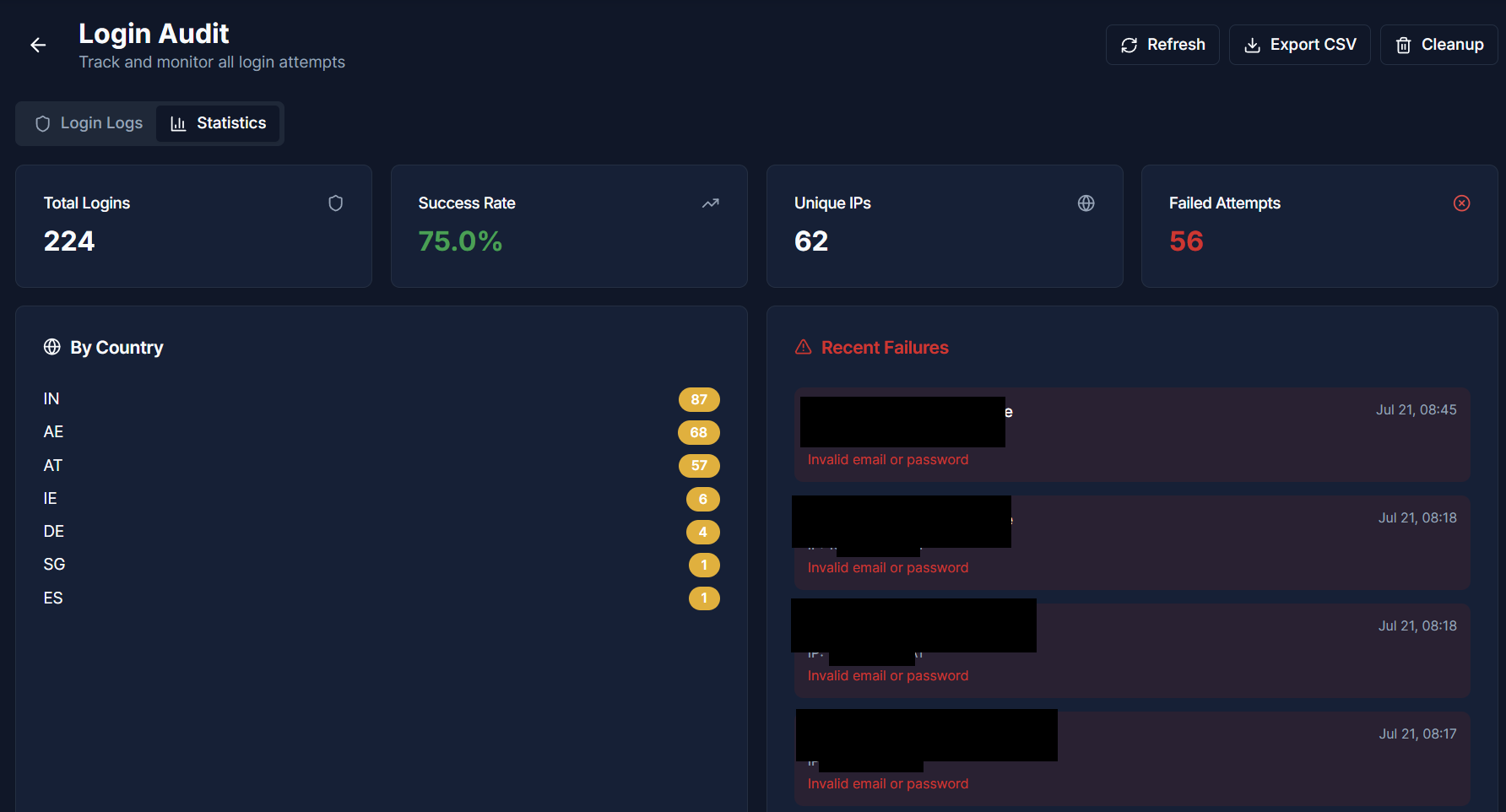
Login audit. Every attempt to log in, success or failure, credentials or SSO, from any IP, at any time, is written to a durable audit table before anything else happens. IP, geolocation, method, outcome. The audit is not a security alerting system; it is a security accountability system. It exists so that when I need to answer "what happened between 4am and 6am on Tuesday," I have an answer, not a shrug.
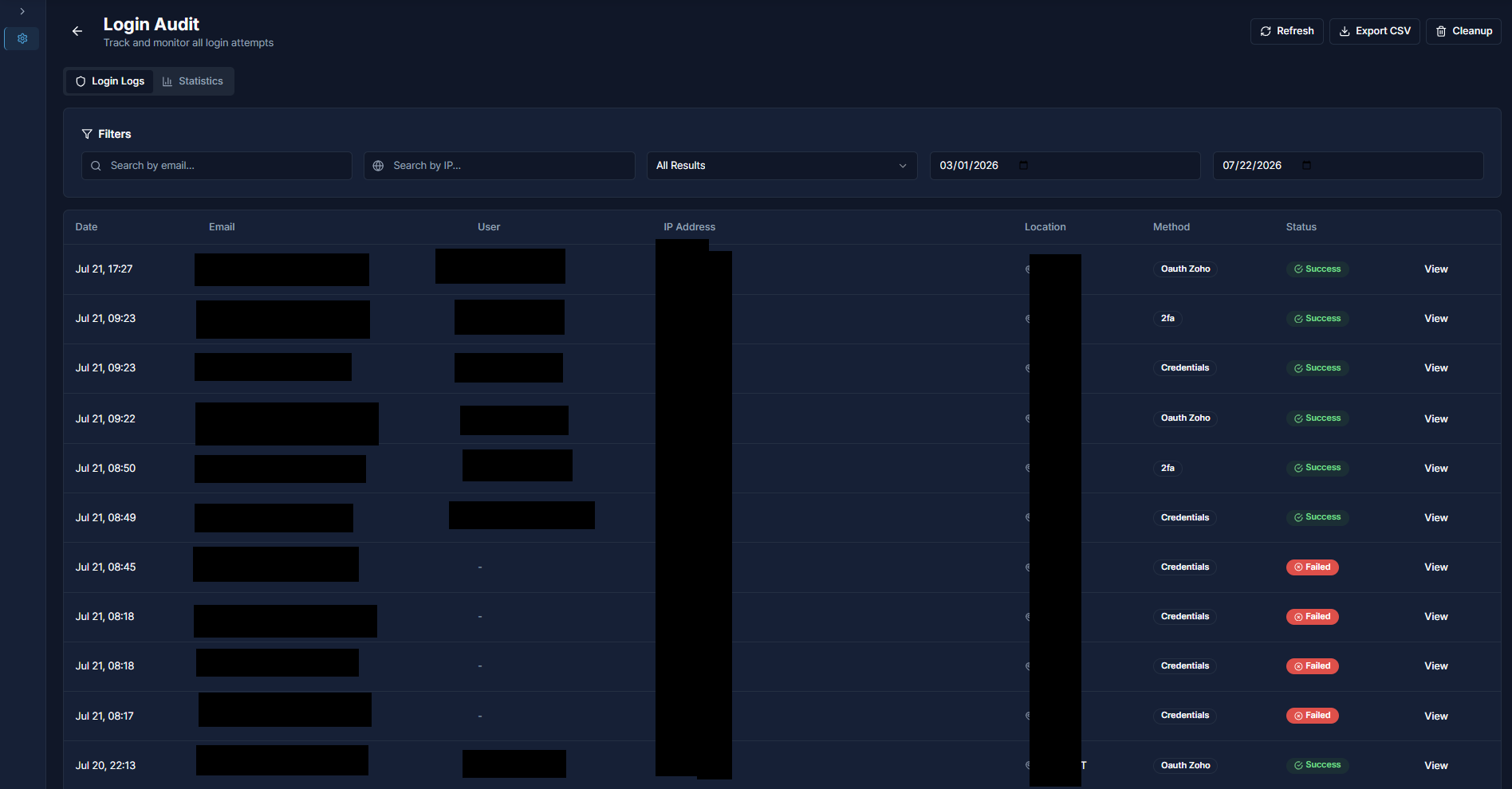
Caption: The login audit table inside the admin panel. Every attempt is written down with when, who, from where, by which method, and whether it succeeded. Demo data shown. The real table is not for public viewing, which is itself a design decision.
The design decisions I would defend
Any real auth stack is a bundle of tradeoffs. Here are the ones I get asked about most, with the reasoning.
Short access tokens plus rotating refresh tokens, instead of one long-lived token. The tradeoff is more moving parts in exchange for a much smaller compromise window. A stolen long-lived token is a badge that works for weeks. A stolen access token is a badge that works for the length of a coffee break. And the refresh-token rotation gives us a hook: when the same refresh token is used twice, something replayed it, and the whole session family gets burned down.
Refresh token stored hashed, not encrypted. Encryption implies we might need to decrypt, which implies a key that lives near the data, which is a category of complexity we do not need. We never need to read the token back. We need to check whether a presented value matches an issued one. A hash does that, cannot be reversed if the database is stolen, and has zero key-management overhead. This is a good default in general: if you never need to decrypt, do not encrypt.
Refresh cookie scoped narrowly to the auth routes, not the whole site. The token is only ever needed by the auth endpoints. Scoping the cookie means it is not sent on every request to the app, which reduces the surface where a bug could leak it into an error response or a log line.
TOTP with backup codes, not SMS. SMS-based second factors are known to be compromised at scale through SIM-swap attacks and telco-side interception. TOTP works offline, requires physical access to the device holding the secret, and does not depend on a third-party carrier. Backup codes cover the "lost phone" scenario without dropping to a helpdesk-heavy recovery flow.
Email-match-only OAuth. If an admin has not already provisioned a user with a given email, OAuth cannot create that user. This inverts a common vulnerability shape where an attacker with an email in a trusted domain (a former team member's personal Gmail, a lookalike domain) can bootstrap access. It also means account provisioning is one workflow, the admin creates the user, regardless of how they end up signing in. Simpler mental model, tighter security.
The state parameter on OAuth is a signed token, not a random string in a session. A random-nonce-in-session approach means your OAuth flow does not survive a server restart or a rolling deploy. The session goes away, the callback comes back with a nonce that does not match anything, and the user sees an error. A short-lived signed state token is verifiable purely from its own contents, survives any deploy, and does not rely on server-side session store consistency.
Session revocation goes through the refresh layer, not the access token layer. Access tokens are stateless by design. You do not check them against a database on every request; that is the whole point. So an individual access token cannot be revoked. What can be revoked is the refresh token family, so that when the current access token expires (soon), no new one will be issued. Combined with a short access TTL, this gives us the "kick them out" property without paying the "check every request against the database" cost.
Login audit records success, not just failure. This is counter to a common instinct: "why log the boring successful logins?" Because when you need to answer "did this user log in from X on Y?" it is the successful login you need, not the failed one. Failed logins are one signal; successful logins are the ground truth of activity.
The uncomfortable part
Same discipline as Part 1: an honest inventory of what I found when I walked the auth code with fresh eyes, specifically to write this piece.
The brute-force protection was implemented, and it worked, but the counter lived in the process memory of the backend container. Every time the container restarted, the counter reset. In effect, an attacker who was rate-limited could get a fresh budget every deploy. Not catastrophic, because bans persist at the network layer via fail2ban, but the application-layer counter was doing less than I thought it was. Fix: moved the counter into a persistent store the app already runs alongside, so it now survives restarts and deploys, with the old in-memory tracking kept as a fallback for the day that store itself has a bad day.
The failed-login alerting was a console.log line in the code with a TODO comment next to it that had been there long enough that I did not remember writing it. The audit table was capturing everything, but nothing was actively pinging me on suspicious patterns. Fix: wired failed-login bursts and lockouts into the same messaging channel that gets infrastructure alerts, with a cooldown so an attack becomes one phone-buzz, not fifty, and a structured log line underneath it, so even if the messenger is down, the event still lands in the log store.
The JWT signing was correct, but the signed tokens did not include an audience or issuer claim. That is fine when only one service issues and verifies these tokens, which is true today, but it becomes fragile the moment a sibling service starts sharing the secret. Fix: added audience and issuer to the signing config, and the verifier now rejects any token that is missing them or carries the wrong ones. Cheap to add now, expensive to add later. So it got added now.
None of these were caused by ignorance. They were caused by "let me finish this feature; I will come back to this." Which is the same story as the drift from Part 1, in slightly different clothes. It is the ordinary erosion of a real production system built by a real person with a finite number of hours.
The fixes are all short. What was expensive was walking the code specifically to find them.
What surprised me
2FA adoption is a change-management problem, not a technical problem. Every implementation guide I read treated it as an engineering task. The engineering was two afternoons. Getting a small team to actually enroll, and to keep their backup codes somewhere they can find under stress, took months and involved several sit-down conversations. If you build the perfect 2FA and no one uses it, you have built nothing.
OAuth is a different set of tradeoffs, not an easier one. People pitch SSO as "let someone else handle the passwords." What they do not mention is that you now depend on that provider's uptime, their security posture, their willingness to keep the API stable, and their consent screens looking legitimate enough that your users do not panic. You are not removing complexity; you are moving it.
Login audit is worth more than login alerting. Alerting sounds active and useful. Auditing sounds passive and dull. In practice, when something happens that needs investigating, the audit is what tells you the truth. The alerting will fire on the loud stuff, which usually is not the interesting stuff. The interesting stuff is often quiet, and the audit is where you find it, weeks later, when a question comes up.
"Remove a person today" is a load-bearing feature, not a nice-to-have. In a team small enough that everyone knows everyone by name, the day someone leaves is a real day that happens. Having a single one-call flow to sever their access is not a compliance box to tick; it is a piece of the operational fabric. I wish I had built it three months earlier.
What I have deliberately left out
If you were expecting a repository link, exact TTLs, a hash cost factor, a rate-limit threshold, or the specific endpoint path names, you will notice I have not published them. That is not accidental.
The reasoning is the same reasoning behind the redactions in Part 1. Specific numbers become attacker inputs. A published TTL is a published expiry-window. A published rate limit is a published just-slow-enough-to-not-trip pace. A published endpoint name is a target. The patterns in this piece are the value; the coefficients are yours to pick based on your own threat model, your own team's tolerance for friction, and your own users' expectations. If I gave you my exact numbers, I would be handing them to everyone else at the same time, and they are the least interesting part of the design anyway.
If you want to build something like this, the useful takeaways are the design shapes:
- Short access token, longer rotating refresh, refresh hashed at rest.
- Refresh cookie scoped narrowly, HttpOnly, SameSite-locked, secure in production.
- 2FA with TOTP and one-shot hashed backup codes.
- Email-match-only OAuth with signed-state callbacks.
- Session revocation via the refresh layer, plus a short access TTL.
- Login audit that captures success and failure.
- Application-layer rate limits that survive restarts (i.e. not in process memory).
Pick the numbers to fit your context.
What's next in this series
- Part 3: From Silent Servers to a Real-Time View. How every container log ships from the origin to a second VPS over a private tunnel, how dashboards get provisioned as code, and how the alerts reach my phone without a per-seat SaaS bill.
- Part 4: The Pre-Production Gates. The fail-closed pipeline every change clears before production, the day it went red five times on a newly onboarded app, how the chain continues past the build with signed artifacts verified at runtime, and a generic verification-script template, free to lift into your own stack.
If any of this is useful, I am glad. If you have done something better, or seen me miss something obvious, I would rather hear that than a compliment.
A note on context: everything here describes independent projects run under Mannat AI Labs. Views and mistakes are entirely my own.